
Spending hours looking down at a phone, working on a laptop, or using a tablet may seem harmless, but these everyday habits can place extra stress on your neck and upper back. Over time, this pattern can contribute to what is commonly called Tech Neck.
Tech Neck is not simply about having poor posture. It describes a pattern of neck and upper-body strain associated with prolonged use of digital devices, particularly when the head remains tilted forward or downward for extended periods.
Understanding what causes Tech Neck and making small changes to how you use your devices can help reduce unnecessary strain and support healthier neck movement. When stiffness spreads into the upper back, osteopathy for back pain may also be relevant.
Tech Neck is a common term used to describe neck discomfort, stiffness, and related symptoms associated with prolonged use of smartphones, computers, tablets, and other digital devices.
The problem often develops when you maintain the same position for a long time, especially with your head positioned forward or downward while looking at a screen.
Your head is supported by the muscles, joints, ligaments, and other structures of your neck. When your head moves away from a more neutral position, the muscles around your neck and upper back may have to work differently to maintain that position.
Tech Neck is therefore less about one specific posture being “bad” and more about spending too much time in one position without enough movement or variation.
Need Help With Pain or Recovery?
Get a personalized treatment plan from our senior physiotherapists at PhysioCare Dubai Healthcare City.
Book online or message us on WhatsApp.

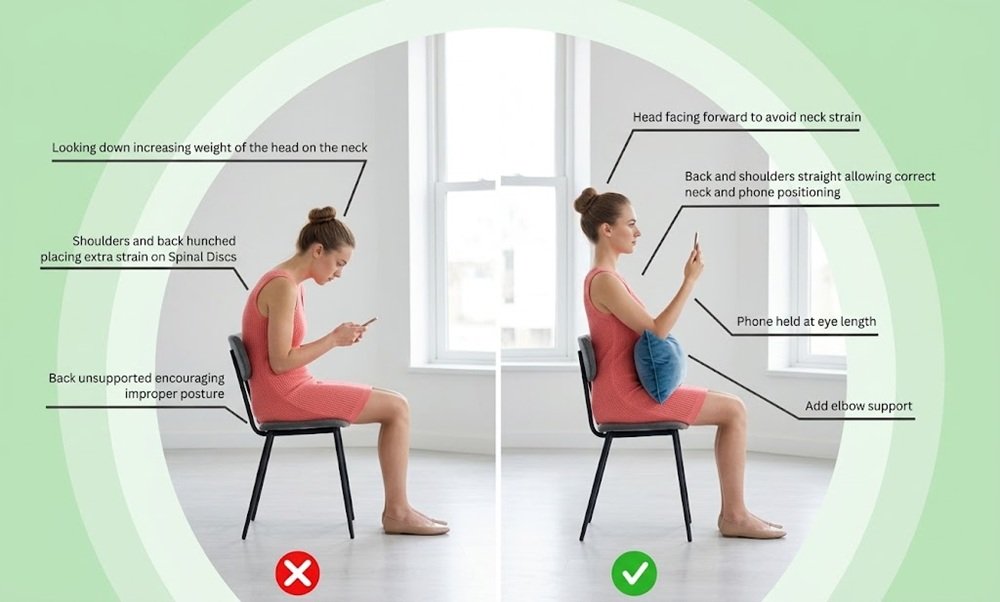
Several everyday habits can contribute to Tech Neck.
One of the most common contributors is prolonged smartphone use. When your phone is held low, you may naturally bend your neck forward and look downward.
The occasional use of your phone in this position is unlikely to be a major concern. The problem is more likely to arise when you remain there for long periods, such as while scrolling, texting, watching videos, or reading.
Working at a desk can also contribute to neck strain, particularly when your screen is too low, too far away, or positioned at an uncomfortable angle.
Laptop use can be especially challenging because the screen and keyboard are connected. Raising the screen may improve neck positioning but can make the keyboard less comfortable, while keeping the keyboard at a convenient height may encourage you to look downward.
Tech Neck is not caused solely by a particular posture. Static posture can also play an important role.
Even a relatively good sitting position can become uncomfortable when maintained for hours without movement. Muscles and joints benefit from regular changes in position, rather than being held in the same position throughout the day.
Reading on a tablet, gaming, working from a laptop, driving while looking down frequently, or using a phone in bed can all increase the amount of time your neck spends in a relatively fixed position.
Individually, these activities may not cause problems. However, repeated exposure throughout the day can contribute to accumulated muscle fatigue and discomfort.

Symptoms can vary from person to person and may develop gradually.
Common symptoms associated with Tech Neck include:
Some people may notice symptoms only after prolonged device use, while others may experience discomfort more consistently.
Tech Neck symptoms can also overlap with other causes of neck pain, so persistent or unusual symptoms should not automatically be attributed to device use.
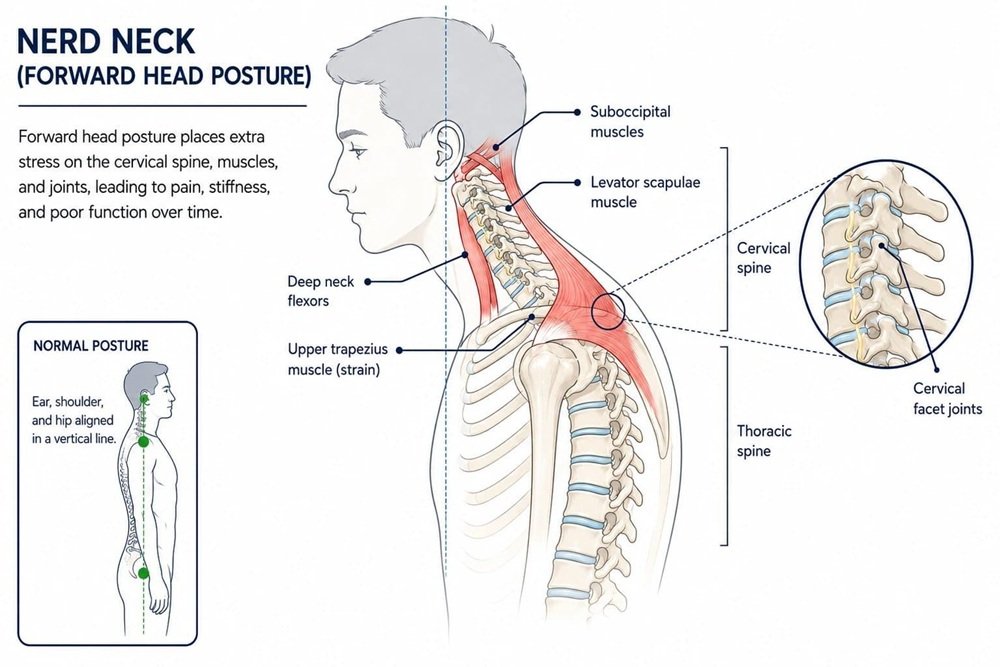
The position of your head affects how the muscles and other structures of your neck work.
When you look straight ahead, your head is relatively aligned over your neck and upper body. As your head moves forward and downward, the muscles around the neck and upper back may need to work harder to help support and stabilize it.
The issue is not that bending your neck is inherently harmful. Your neck is designed to move in many directions. The concern is holding a flexed or forward-head position for prolonged periods, particularly when it is repeated throughout the day.
This is why changing positions and moving regularly can be just as important as trying to maintain a “perfect” posture.

The good news is that preventing Tech Neck does not require avoiding technology. Small changes to your daily habits can reduce prolonged strain and encourage more movement.
When using a computer or monitor, position the screen so that you do not need to constantly bend your neck downward to see it.
For prolonged laptop use, consider using a separate keyboard and mouse if raising the screen makes the built-in keyboard uncomfortable.
The goal is not to achieve a rigid position but to make a neutral, relaxed neck position easier to maintain.
Rather than holding your phone near your waist or lap for long periods, bring it closer to eye level when practical.
You do not need to hold your phone directly in front of your face. Even a modest increase in screen height can reduce the amount of time you spend looking sharply downward.
One of the simplest ways to reduce Tech Neck is to avoid staying in the same position continuously.
During long periods of screen use, take short movement breaks. Stand up, walk around, move your shoulders, or gently move your neck through a comfortable range.
These breaks can help interrupt prolonged static positioning.
There is no single perfect sitting or standing posture that you need to maintain all day.
Instead, try to change positions regularly.
You can alternate between sitting and standing, adjust your chair, reposition your screen, or simply move your body when you notice that you have been in one position for too long.
When working at a desk, appropriate support can make it easier to maintain a comfortable position.
Your chair should allow you to sit comfortably, while your arms should be supported when possible. A stable working setup can reduce the tendency to lean forward toward the screen.
Using your phone while lying on your stomach, curled up on a sofa, or with your neck unsupported may encourage awkward positions.
If you are going to use a device for an extended period, choose a position that allows your neck and upper body to remain comfortable and gives you the freedom to change positions.
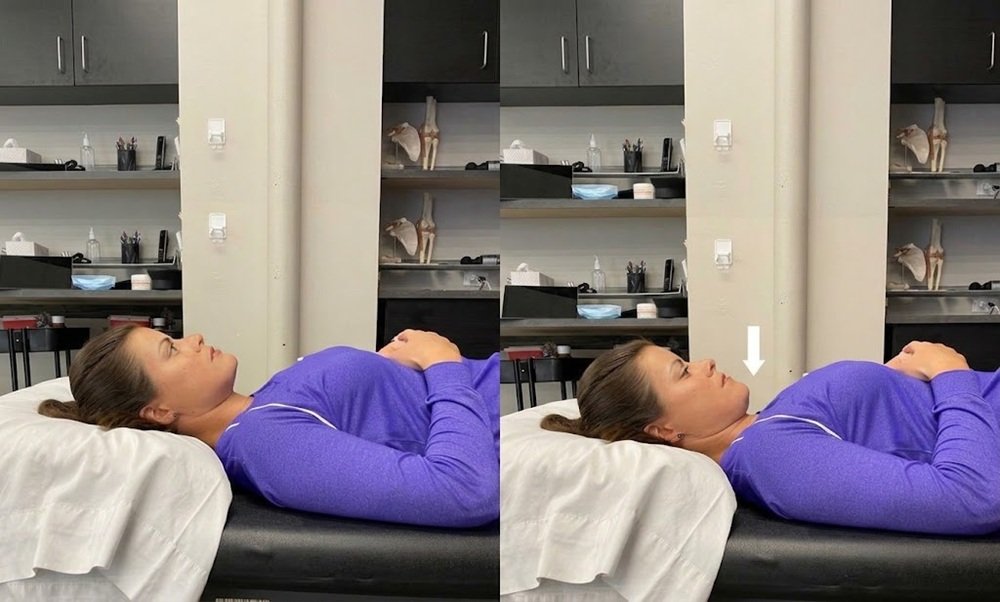
Regular movement and targeted exercises may help support the muscles and joints involved in neck and upper-body movement.
The specific exercises that are appropriate can vary depending on your mobility, symptoms, and physical condition. However, some commonly used movements include:
A gentle chin tuck involves drawing your chin slightly backward without looking up or down.
This movement can help you practice a more neutral head and neck position.
Slowly moving your neck within a comfortable range can help prevent prolonged stiffness.
You might gently turn your head from side to side or move it through other comfortable directions. Movements should be controlled and should not cause significant pain.
Exercises involving gentle shoulder-blade movement can help develop awareness and control of the upper back and shoulder region.
For example, gently drawing the shoulder blades backward without shrugging may help you become more aware of your upper-body position.
Long periods of sitting and device use may involve a rounded upper-body position. Gentle chest-opening movements can help maintain comfortable movement through the chest and shoulders.
However, exercises should be selected according to your individual needs rather than performed simply because they are associated with Tech Neck.
There is no fixed timeline for Tech Neck.
Mild discomfort related to prolonged screen use may improve after changing your position, taking movement breaks, and reducing the amount of time spent in aggravating positions.
More persistent symptoms may take longer to settle, particularly when they have been present for a long time or when another underlying problem is contributing to the discomfort.
If your symptoms continue despite changing your daily habits, a healthcare professional can help determine whether Tech Neck is actually the cause and whether further assessment is needed.
Not every episode of neck discomfort requires professional care. However, it is worth seeking an appropriate medical assessment if your symptoms are persistent, severe, worsening, or interfering with everyday activities.
You should also seek professional advice if neck pain is accompanied by symptoms such as:
These symptoms may have causes other than Tech Neck and should not simply be assumed to result from screen use.
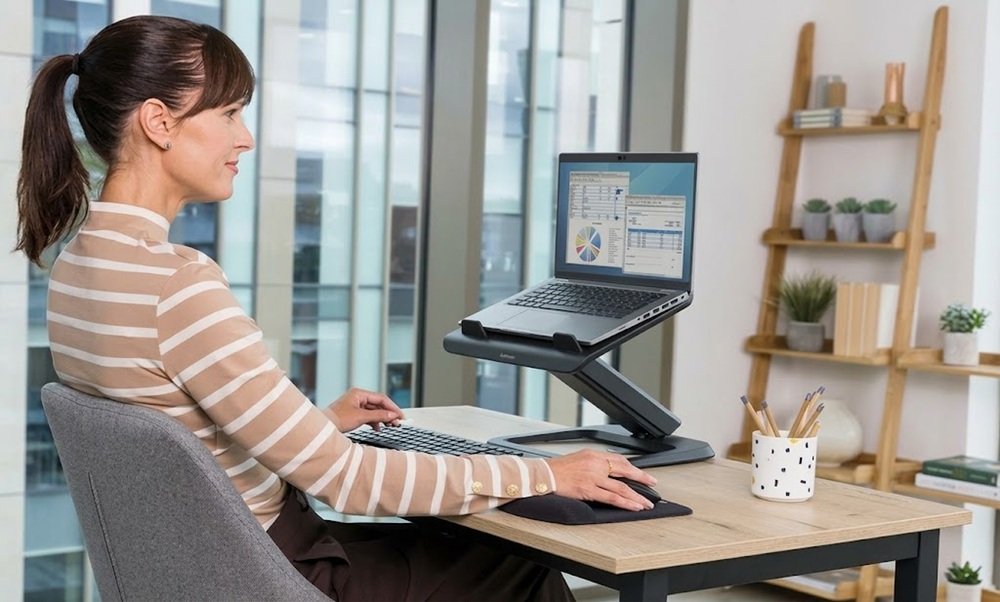
Preventing Tech Neck is largely about reducing prolonged static positions and making movement part of your daily routine.
Try to remember these simple habits:
You do not need to maintain perfect posture every second. The more useful goal is to create a work and device-use routine that allows your body to move, adjust, and recover regularly.
Need Help With Pain or Recovery?
Get a personalized treatment plan from our senior physiotherapists at PhysioCare Dubai Healthcare City.
Book online or message us on WhatsApp.
Tech Neck is a commonly used term for neck and upper-body discomfort associated with prolonged use of digital devices. It is not a specific medical diagnosis, and similar symptoms can have many different causes.
It can be associated with headaches, particularly when prolonged neck and upper-body tension contributes to discomfort. However, headaches have many possible causes, so recurring or unusual headaches should not automatically be attributed to Tech Neck.
Yes. Prolonged device use can contribute to tension and discomfort around the neck, shoulders, and upper back. Changing positions and taking regular movement breaks may help reduce this type of strain.
Using a phone does not automatically cause Tech Neck. The greater concern is prolonged or repetitive use in positions that keep the neck bent or forward for extended periods.
Mild symptoms may improve when you change the habits that contribute to them. Reducing prolonged static positions, taking movement breaks, and staying physically active may help. Persistent symptoms should be assessed rather than ignored.
Tech Neck is not necessarily permanent. Symptoms can improve when contributing habits are changed, although the outcome depends on the individual and whether another condition is contributing to the pain.
Position your screen comfortably, avoid leaning toward it, support your arms when possible, and change positions regularly. Taking brief movement breaks throughout the workday can also help prevent prolonged static loading of the neck and upper back.
Tech Neck is closely linked to the way modern daily routines combine prolonged screen use with limited movement. Looking down at a phone or working at a computer is not inherently harmful, but spending long periods in the same position can contribute to neck and upper-body discomfort.
The most practical approach is not to search for a perfect posture. Instead, move regularly, vary your position, adjust your screen setup, and avoid spending long periods with your neck held in one position.
If neck pain persists, becomes severe, or is accompanied by symptoms such as numbness, weakness, or significant loss of movement, professional assessment can help identify the underlying cause.

Rei Anne
Dubai Health Authority (DHA) Licensed Physiotherapist
Shoulder pain and stiffness can make everyday activities difficult, from reaching overhead to getting dressed or lifting objects. However, frozen shoulder and rotator cuff...
Frozen shoulder, also known as adhesive capsulitis, is a condition that causes shoulder pain, stiffness, and restricted movement. It typically progresses through different stages,...

Leave a Comment